HAWK
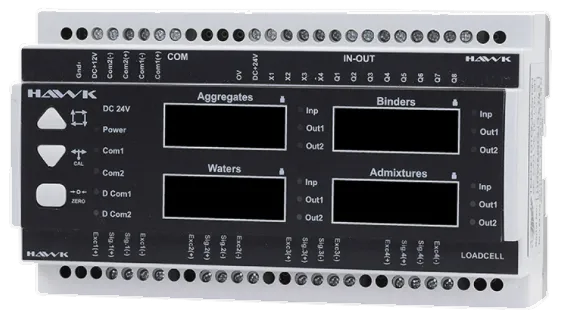
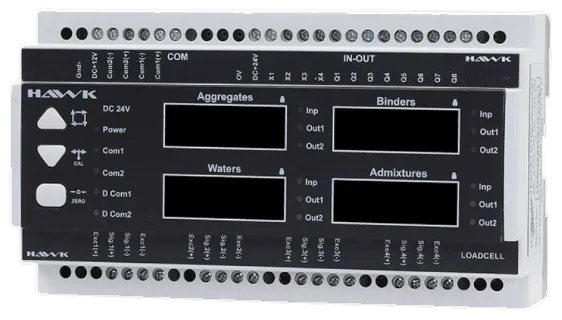
4-scale DIN-rail indicator
Panel-mounted DIN-rail weighing indicator for concrete plant automation systems.
Drag to rotate; pinch or use the mouse wheel to zoom; double-tap resets the view. On the keyboard, arrow keys rotate, + and − zoom, 0 resets.
- scales
- 4
- Modbus RTU
- RS485
- internal counter resolution
- 20 bit
- mm, DIN rail
- 157 × 91 × 58
HAWK is a multi-scale weighing and dosing control unit that mounts on a DIN rail inside the panel. Load cell terminals for the aggregate, cement, water and admixture scales are on the underside, with fast and fine filling outputs for each scale.
It talks to the PLC over RS485 Modbus RTU. Calibration can be done from the keys on the device or from the BetonicTCP production software.
In automation, HAWK is used with the TMA12 PLC as the 4-scale automation set; adding ANT makes it a 5-scale set.
Technical specifications
Weighing
- Scales
- 4: aggregate, cement, water, admixture
- Input type
- Load cell or pulse meter (4 pulse inputs)
- Load cell excitation
- 5 V DC
- Load cell input resistance
- 350 Ω
- Internal counter resolution
- 20 bit
- Digital filter
- Averaging 0-6, sudden load 0-9 steps
Inputs and outputs
- I/O
- 4 digital inputs, 8 digital outputs (fast and fine filling per scale)
Communication
- Communication
- RS485 Modbus RTU
- Baud rate
- 1200 - 115200 bps
Electrical
- Supply voltage
- 12-24 V DC (24 V DC recommended)
Mechanical and environment
- Dimensions
- 157 × 91 × 58 mm
- Mounting
- DIN rail inside the panel
- Operating temperature
- -20 °C to +50 °C
Operation
- Calibration
- With device keys or from BetonicTCP
Source: HAWK User Manual (Turkish, firmware VR 52)
For demonstration only
Put a load on the scale,
watch the reading.
Drag the test weights onto the platform or tap to place them. The reading swings until the load settles; once it holds, the stable lamp lights up. Try the zero and tare keys as well.
For demonstration only. The weights and readings are examples; this is not an exact copy of the HAWK or ANT display. Capacity and division are set for your scale.
- Total (gross)
- 0 kg
- Tare
- 0 kg
- Net
- 0 kg
Drag a weight onto the platform or tap it; tap again to put it back.
Troubleshooting HAWK
Troubleshooting steps from the manual. Pick the problem to see the steps.
Full troubleshooting guideWeighing is wrong after C 01, C 02 or C 03 was changedANTHAWK
Possible cause
Scale capacity and calibration are set by C 01 (division value), C 02 (number of divisions) and C 03 (decimals); changing them breaks the calibration.
Steps to solve it
- Restore the old values or recalibrate for the new values.
- Calibrate with reference (test) weights of known mass.
Note In case of a fault, the indicator or load cells can be tested in the IC SAYAÇ (internal counter) menu.
Request a quote for this product.
Tell us briefly about your plant or weighbridge and we will reply with a suitable configuration.
- Head office+90 212 321 31 21
- Emailinfo@teknotomasyon.com
- AddressMerkez Mah. Alibey Cad. 12A
Kağıthane / İstanbul
Directions - DealersFind a dealer near you